Showing posts with label Hardware. Show all posts

Tuesday, February 28, 2012

Apple Wireless Keyboard in Windows 7: Key Mapping Solution

Freeware from google code: KEY MAPPER

I have been looking for this for a long time! I hated using my Apple Wireless Keyboard on Windows 7 because of key mapping: cmd + w should close tabs and windows, copy and paste but under Windows 7 it opens Start Menu. I almost gave up my hope few months ago after reading on some blog that the only solution is to install Boot Camp drivers for Apple Keyboard. I tried it with no luck and gave up. (installing Boot Camp drivers may still work) 

Better and faster solution is Key Mapper ! This small (615KB in size) program will bring the speed and comfort of your Apple Wireless Keyboard to Windows 7. You won't be able to switch back and forth between mappings because of the way Windows 7 is handling them, but who would like to switch back to standard useless mapping with! On the side note, there is one restart necessary for your mappings to take effect (again it is a Windows 7 thing only).

Here is how it works.

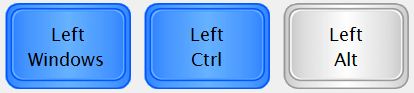
After Installation you will have to start the program and click on Mappings > Show > Boot Mappings. Now we will have to map 2 keys. Left Control to Left Windows and Left Windows to Left Control. Here is a picture for reference how a mapping for Apple Wireless Keyboard should look like:

Freeware from google code: KEY MAPPER


Monday, July 4, 2011

bluetooth on mac

>>>Update<<< NEW LION INSTALL GUIDE: 


>>>Update<<< Chameleon 2.0 for Lion here: 


/Update!
Here you can read how to fix your CSR bluetooth dongle: prasys article on bluetooth

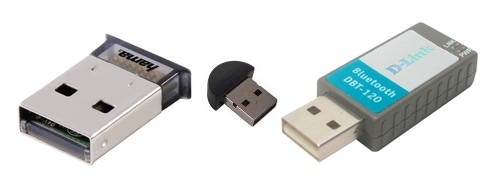
There are many Bluetooth adapters out there, all of them more or less compatible with windows. If you want to use Bluetooth on Mac you have to find out which Radio and Firmware it uses. Some of $2 dongles will work under mac. If your Bluetooth adapter isn't compatible out of the box, then you might be able to flash it to compatible Firmware. Flashing firmware requires bluetooth dongle which can be flashed. Usually those bigger ones like D-Link DBT-120.

The best compatibility you will get with D-Link DBT-120 v1,2,3, and b4. You will be able to flash it with Apple own bluetooth Firmware and thus get the max compatibility. Flashing can be done only on Tiger as the software doesn't work on Intel Macs. So if you have G5 or even G4 with Tiger or something older (it works from 10.3) I advise you to buy it, and you will never have problems with bluetooth. This dongle also works in BIOS (HCI HID automatic switching only when USB legacy is enabled in BIOS) so after it's plugged in you can trash your wired one.

Mac Compatible Radios:

CSR - Cambridge Silicon Radio (Vendor ID 0x0012)

Firmware Versions:
HAMA Bluetooth Nano - 5276 also 52.76 couldn't be Flashed (works on real Mac)
OEM No Name - 1963 also 19.62 couldn't be Flashed (works on real Mac)

Broadcom - Vendor ID 0xa5c
Only those versions are supported by Apple: Broadcom BCM2045/2046
Needs custom .kext or kext patching.


Compatilbe Bluetooth Dongles: (please do your own research, sleep might not work OOB)

BTD-123 Gembird
BTD211 AZiO
RF-FLBTAD Rocketfish
USBBT100 Linksys
BTA-6210 Cirago
Asus USB-BT21 Mini Bluetooth Dongle Asus
Bluetooth 2.1 USB Adapter (15542) Trust
Belkin Mini Bluetooth-Adapter Belkin
Trust (Broadcom BCM2045A)
D-Link DBT-122
Keysonic USB

Sunday, April 19, 2009

Using Apple Remote on Hackintosh


>>>Update<<< NEW LION INSTALL GUIDE: 


>>>Update<<< Chameleon 2.0 for Lion here: 


After hours spent on fine tuning and getting everything to work just like on a real Mac (or even better), many of us started to miss some of Windows functionality and compatibility. I'm not talking about games and other applications but about hardware. You can't just go to the computer store and grab a DVB-T stick and be sure it will be recognized on your hackintosh. Choosing new hardware involves hours spend on forums asking questions, reading reviews to find the 100% compatible piece of hardware - PC hardware. The ultimate goal having a hackintosh is to get it as close as possible to the real thing without spending thousand of dollars on it.

iSight and Apple Remote are included with many apple computers, Apple Remote is the toughest to get to work properly.

iSight - use this plugin and hope your webcam is supported: macam3.4mb
(After adding macam.component your webcam should work just like iSight)

Apple Remote: needs IR receiver, the cheapest solution is Windows MCE (eHome) 2005 Receiver, you can read more on compatibility here:
- Remote Buddy - 19.99 €
- Twisted Melon - $15.95

As you see you will have to use some software to get it to work but it works very well.
Google Reader or Homepage Add to My Yahoo! Subscribe with Bloglines Subscribe in NewsGator Online Add to My AOL Add to Technorati Favorites!

Welcome!

You are probably looking for a working copy of Tiger or Leopard, ready to install on a "white box" pc. I can't give you a link to download it, so please don't even ask for it. This blog will inform you about working versions of OSX86. You have to find a copy yourself. (try some popular torrent sites)